


10 ips at 203 dpi
Up to 254 mm/s (10 ips) at 203 dpi and 152 mm/s (6 ips) with the optional 300 dpi printhead, across a 104 mm print width. Speeds can be set from 2 ips upwards in 1 ips steps.

IIoT
Browse IIoT
Zebra · Industrial barcode label printer
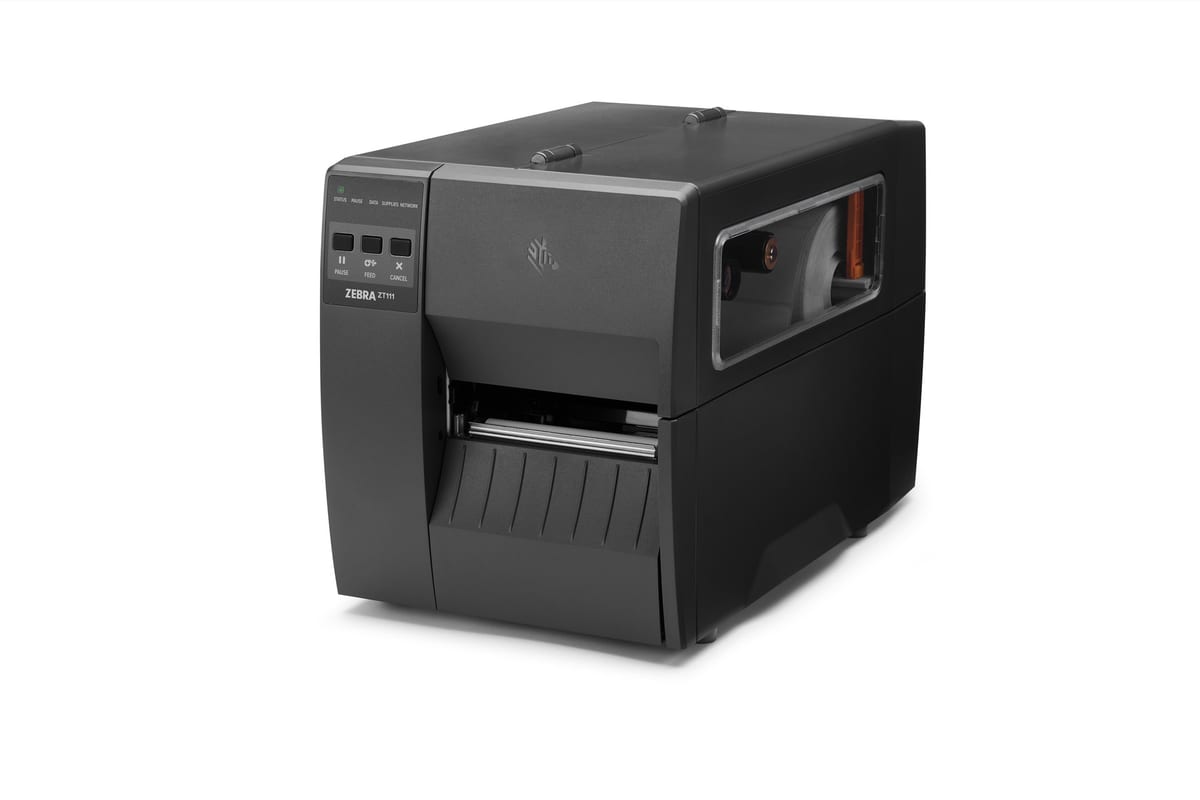
Zebra's entry-level 4-inch industrial label printer and the replacement for the ZT220: thermal transfer or direct thermal, up to 10 ips at 203 dpi, a simple three-button panel, and Wi-Fi, a cutter or a peeler added on site.
ZT111 price in India: ask our team for today's competitive price. Share your requirement and budget, and we will help you choose the right configuration and send a written quotation with current pricing and delivery time.
Covered by the manufacturer's warranty. The warranty period, terms and conditions are as declared by Zebra.
Already use one? Need service? Log a service call for the Zebra ZT111
Why the ZT111
The ZT111 is a ZT100 Series model built for light-industrial printing on a limited budget, and Zebra names it as the replacement for the ZT220. It prints thermal transfer or direct thermal at 203 dpi, or 300 dpi as an option, and takes Wi-Fi, a cutter or a peeler after purchase.
Up to 254 mm/s (10 ips) at 203 dpi and 152 mm/s (6 ips) with the optional 300 dpi printhead, across a 104 mm print width. Speeds can be set from 2 ips upwards in 1 ips steps.
Zebra fits the ZT111 with a three-button keypad and five status LED icons instead of a screen. A bi-fold media door with a large clear window needs less height above the printer to open, and colour-coded touch points mark where to load media.
USB 2.0, RS-232 serial, 10/100 Ethernet, USB Host and Bluetooth Low Energy are built in. One option slot takes an 802.11ac Wi-Fi card or a second 10/100 Ethernet card.
It runs ZPL and ZPL II, with EPL and EPL2 on 203 dpi models. Zebra says the ZT111 is backwards compatible, and its printer emulations let it take over from other brands' printers without changing label formats.
Media rolls up to 203 mm outside diameter on a 76 mm core, or 152 mm on a 25 mm core, and ribbons up to 450 m long, so a busy line changes supplies less often.
Zebra lists field-installable Wi-Fi, cutter and peeler upgrades and a kit to convert between 203 and 300 dpi. The platen and printhead come out without tools, and printhead element out detection reports failed printhead elements.
Used in
For buyers in India
These are the points buyers in India ask us about the ZT111. Mention the ones that apply to you when you request a quote.
Zebra names the ZT111 as the ZT220's replacement and supports the ZT220 until 31 January 2027. The ZT111 runs ZPL, and EPL on 203 dpi models; ask us to set up your label format and print test labels on your roll before you change over.
Zebra runs EPL and EPL2 only on 203 dpi ZT111 models; the 300 dpi version prints ZPL. If your older software sends EPL, order the 203 dpi printer, or tell us and we confirm the setting in the quotation.
Zebra rates the ZT111 for 5 °C to 40 °C in thermal transfer and 0 °C to 40 °C in direct thermal, at 20-85% humidity, non-condensing; place it away from ovens, sealers and direct sun.
Specifications
| General | |
|---|---|
| Print methods | Direct thermal or thermal transfer |
| Construction | Metal frame and plastic enclosures; bi-fold media door with large clear window; side-loading supplies path |
| Printhead | Thin film printhead with E3 Element Energy Equalizer |
| User interface | 3-button keypad with five status LED icons |
| Memory | 256 MB SDRAM (32 MB user available); 256 MB on-board linear Flash (64 MB user available for downloadable objects) |
| Firmware | ZPL and ZPL II; EPL and EPL2 (EPL on 203 dpi models only; EPL line mode on direct thermal models only) |
| Standard features | Advanced label counters; auto calibration on power-up or head close (about two to three labels); onboard analytics; printhead element out detection; tool-less platen and printhead removal; ENERGY STAR certified |
| Security | Secure Boot, Protected Mode, Simplified Printer Decommissioning and Zebra Secure Service Commands (part of PrintSecure) |
| Software | Print DNA Basic (features vary by model; some need a licence); ZebraDesigner Essentials label design tool (free) |
| Printing | |
| Resolution | 203 dpi/8 dots per mm; 300 dpi/12 dots per mm (optional) |
| Maximum print width | 4.09 in./104 mm |
| Maximum print speed | 10 ips/254 mm/s (203 dpi); 6 ips/152 mm/s (300 dpi) |
| Programmable print speeds | 2-10 ips (51-254 mm/s) at 203 dpi; 2-6 ips (51-152 mm/s) at 300 dpi; in 1 in. steps |
| Maximum print length | 203 dpi: 157 in./3,988 mm; 300 dpi: 73 in./1,854 mm |
| Media registration tolerance | Vertical and horizontal: less than ±1.0 mm |
| Media sensors | Adjustable transmissive and reflective sensors |
| Barcode ratios | 2:1, 7:3, 5:2 and 3:1 |
| 1D barcodes | Code 11, Code 39, Code 93, Code 128 with subsets A/B/C and UCC Case Codes, ISBT-128, UPC-A, UPC-E, EAN-8, EAN-13, UPC and EAN with 2 or 5 digit extensions, Plessey, Postnet, Standard 2-of-5, Industrial 2-of-5, Interleaved 2-of-5, Logmars, MSI, Codabar, Planet Code |
| 2D barcodes | Aztec, Codablock, PDF417, Code 49, Data Matrix, MaxiCode, QR Code, MicroPDF417, TLC 39, RSS-14 (and composite) |
| Fonts and graphics | 7 bitmapped and 1 smooth-scalable font (CG Triumvirate Bold Condensed); Unicode-compliant; IBM Code Page 850 international character sets; user-defined fonts and graphics, including logos |
| Media and ribbon | |
| Media width (label and liner) | 0.75 in./19.4 mm to 4.50 in./114 mm |
| Media roll size | 8.0 in./203 mm O.D. on a 3 in./76 mm I.D. core; 6.0 in./152 mm O.D. on a 1 in./25 mm I.D. core |
| Media thickness | 0.076 mm to 0.25 mm |
| Media types | Continuous, die-cut, notch, black mark |
| Maximum non-continuous label length | 39 in./991 mm |
| Minimum label length | Tear-off: 17.8 mm; peel: 12.7 mm; cutter: 25.4 mm |
| Ribbon length | 1,476 ft./450 m (thermal transfer models) |
| Ribbon width | 1.57 in./40 mm to 4.33 in./110 mm |
| Ribbon core and roll | 1.0 in./25.4 mm I.D. core; maximum roll 3.2 in./81.3 mm O.D. (450 m); ribbon wound ink-side out |
| Media handling options | Front-mount passive peel without take-up spindle; front-mount guillotine cutter |
| Connectivity | |
| Standard | USB 2.0 (high speed); RS-232C serial with DB9F connector (4,800-115,200 baud); 10/100 Ethernet; USB Host; Bluetooth Low Energy |
| Options (one per printer) | 802.11ac Wi-Fi option card; 10/100 Ethernet option card (second Ethernet port) |
| Keyboard display unit | ZKDU keyboard display unit for stand-alone printing (needs a null modem adapter on a DB9 serial connection) |
| Physical and environment | |
| Dimensions (closed) | 17 in. L x 9.5 in. W x 11 in. H; 432 mm L x 241 mm W x 279 mm H |
| Weight | 17 lb/7.7 kg |
| Operating temperature | Thermal transfer: 5 °C to 40 °C; direct thermal: 0 °C to 40 °C |
| Operating humidity | 20% to 85% non-condensing |
| Storage/transportation | -40 °C to 60 °C; 5% to 85% non-condensing |
| Electrical | Universal auto-ranging (PFC-compliant) power supply 100-240 VAC, 50-60 Hz; ENERGY STAR certified |
| Warranty | |
| Warranty | Covered by the manufacturer's warranty. The warranty period, terms and conditions are as declared by Zebra. |
Ask for labels, ribbons and any Wi-Fi card, cutter or peeler in the same quotation.
Specifications from Zebra's ZT111 technical specifications (Zebra USA English file, 09/27/2023) and ZT111 spec sheet (Zebra UK web edition, 03/20/2023, linked from Zebra Asia Pacific's ZT111 page); we confirm the India configuration in the quotation, last checked 20 October 2026. Makers can change specifications without notice; we confirm the exact model and configuration in your written quotation. About our product information
Compare
| Feature | Zebra ZT111 | Zebra ZT231 |
|---|---|---|
| Maximum print width | 104 mm (4.09 in.) | 104 mm (4.09 in.) |
| Maximum print speed (203 dpi) | 254 mm/s (10 ips) | 305 mm/s (12 ips) |
| Maximum print speed (300 dpi) | 152 mm/s (6 ips) | 203 mm/s (8 ips) |
| Resolution | 203 or 300 dpi | 203 or 300 dpi |
| User interface | 3-button keypad, five status LED icons | 4.3 in. colour touch screen |
| RFID | Not offered | Field-installable UHF kit |
| Best for | Entry-level 4-inch labelling on a limited budget | Light-industrial labelling in a small space |
If your job differs from what the ZT111 is built for, these Zebra models may fit it better:
Not sure which one fits? Tell us how you will use it and we will recommend a model.
Downloads
Questions buyers ask
The ZT111 price depends on the resolution you choose (203 or 300 dpi), the options you add and the quantity. We can quote the labels and ribbon with it. Ask our team for today's competitive price: share your requirement and budget, and we will help you choose the right configuration and send a written quotation with current pricing and delivery time.
Yes. Zebra's ZT111 page says it replaces the ZT220, and Zebra's ZT220 support page names the ZT111 as the replacement. Zebra stopped selling the ZT220 on 27 June 2022 and supports it until 31 January 2027.
Both. It prints thermal transfer with ribbons 40-110 mm wide and up to 450 m long on a 25.4 mm core, and direct thermal without a ribbon.
Yes. Zebra lists field-installable upgrades: an 802.11ac Wi-Fi card or a second Ethernet card (one per printer), a front-mount peeler without liner take-up and a guillotine cutter. A DPI Conversion Kit changes the printhead between 203 and 300 dpi.
Labels and liner from 19.4 mm to 114 mm wide, rolls up to 203 mm outside diameter on a 76 mm core or 152 mm on a 25 mm core, and media 0.076 mm to 0.25 mm thick. It prints up to 104 mm wide.
The ZT111 runs ZPL and ZPL II, and EPL and EPL2 on 203 dpi models. Zebra says it is backwards compatible and offers Printer Emulations for other brands' formats. Ask us to set up your label format and print test labels on your roll.
Both print 104 mm wide at 203 or 300 dpi from the same 203 mm rolls and 450 m ribbons. The ZT231 is faster (12 ips against 10 ips at 203 dpi; 8 against 6 ips at 300 dpi), has a 4.3-inch colour touch screen and offers a UHF RFID kit; Zebra lists no RFID option for the ZT111.
Yes. We install the ZT111 at your site, connect it so your ERP, warehouse or billing software prints to it (our own warehouse management system included) and train the people who use it. Tell us the software when you ask for a quote, and we include the setup in the quotation.
Send your label size, how many labels you print a day and the software you print from; we reply with a written quotation.
Since 2014 · 2000+ customers · 75,000+ devices installed · On-site installation & training · Software & ERP integration