Reads RFID-tagged goods at the counter
Zebra's spec sheet says the RFID model combines a barcode scanner and an RFID reader, and that staff can scan multiple items at once without line of sight. The nominal read range is about 45.7 cm.

Zebra · Hands-free barcode scanner with RFID reader
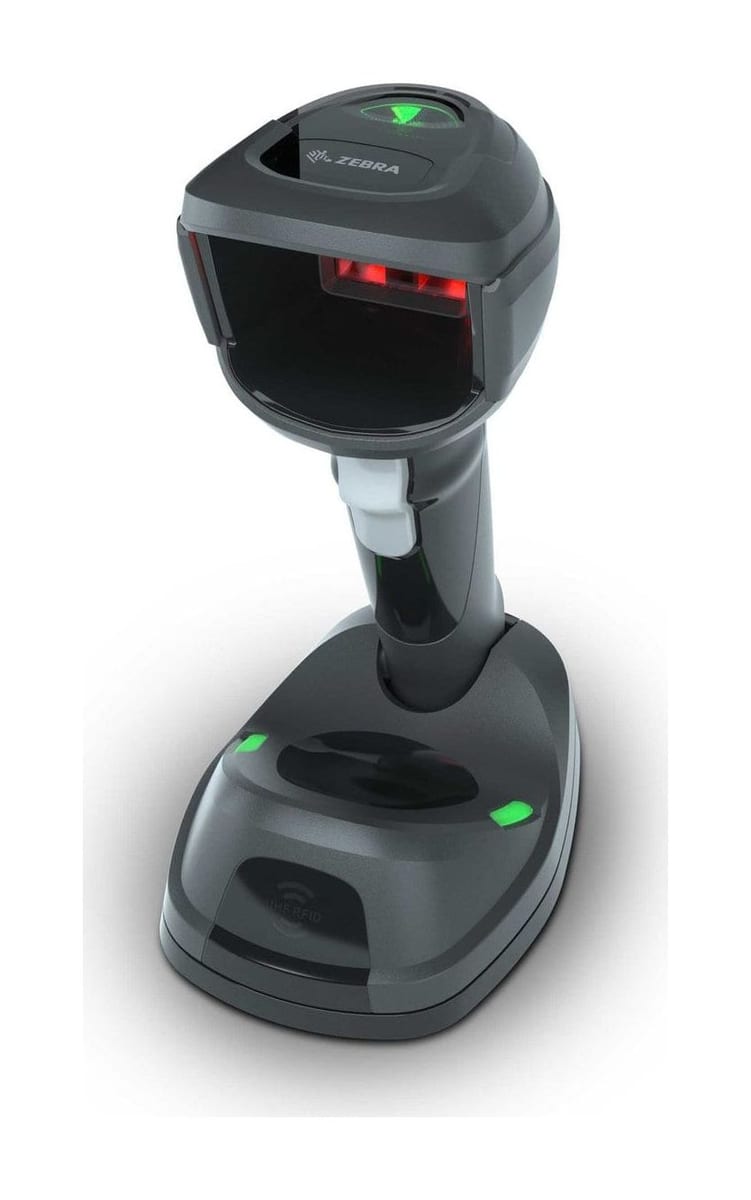
The RFID version of Zebra's DS9908 corded hybrid scanner: it reads barcodes hands-free on its built-in stand or in the hand, and reads and writes RFID tags at the point of sale.
Zebra DS9908R price in India: on written quotation. Share the model, quantity and city; we reply within one working day (Monday to Saturday, 9:30 AM to 6:30 PM).
Covered by the manufacturer's warranty. The warranty period, terms and conditions are as declared by Zebra.
Already use one? Need service? Log a service call for the Zebra DS9908R
Why the DS9908R
The DS9908R is the model in Zebra's DS9900 Series that adds an RFID reader to the corded hybrid scanner. Zebra Asia Pacific lists it on a page of its own, beside the DS9908. It reads RFID tags and barcodes at the counter and can write data to RFID tags.
Zebra's spec sheet says the RFID model combines a barcode scanner and an RFID reader, and that staff can scan multiple items at once without line of sight. The nominal read range is about 45.7 cm.
Zebra says the DS9900 Series RFID model can write data to RFID tags, so staff can commission tags on new inventory items and returned goods.
Zebra's DS9908R page says its complimentary RFID data conversion software lets you read RFID tags without modifying your existing POS application. Tell us your billing software when you ask for a quote.
Zebra's spec sheet says the reader operates with just 5 VDC and does not require an external power supply. The DS9908R draws 400 mA typical when operating and 135 mA typical on standby at 5.0 V.
A capacitive touch sensor and an accelerometer switch the DS9900 Series to handheld mode when staff pick the scanner up. Zebra's sheet says there are no mechanical components to wear out.
Zebra lists the DS9908R as IP42 and designed to withstand multiple drops at 1.2 m to concrete and 2,000 tumbles in a 0.5 m tumbler. It is rated from 0 °C to 50 °C.
Used in (choose yours to ask for a quote)
For buyers in India
These are the points buyers in India ask us about the DS9908R. Mention the ones that apply to you when you request a quote.
Zebra's spec sheet lists the DS9908R frequency range by region: US 902 - 928 MHz, EU 865 - 868 MHz and Japan 916 - 923 MHz. Tell us where the scanner will work and send us sample tags; we confirm the configuration in the quotation.
Zebra lists USB, RS232, keyboard wedge and TGCS (IBM) 46XX over RS485 for the DS9900 Series, and an input of 4.5 to 5.5 VDC. Tell us the POS terminal and the port you will use, and we confirm the interface cable in the quotation.
The DS9908R is 20.3 cm high, 9.9 cm wide and 14.6 cm deep and weighs 420 g. Zebra's DS9900 accessory guide says its multi-mount bracket fits the DS9908 only and will not fit the DS9908R, so plan for the scanner to stand on the counter.
Zebra gives a nominal read range of about 45.7 cm and an RFID power output of 3 dBm to 22 dBm. Tell us the tag type and the distance at your counter, and we confirm what Zebra states for the unit we quote in the quotation.
Specifications
| General | |
|---|---|
| Model (as Zebra lists it) | DS9908R hands-free scanner (Zebra Asia Pacific product page); DS9908R in the DS9900 Series for Retail spec sheet |
| Corded/Cordless | Corded |
| Form factor | Handheld; hands-free/presentation |
| Color | Midnight Black (spec sheet); Black (product page) |
| Input Voltage Range | 4.5 to 5.5 VDC Host Powered; 4.5 to 5.5 VDC External Power Supply |
| Current | DS9908R operating current at nominal voltage (5.0 V): 400 mA (typical); standby current (idle): 135 mA (typical) |
| Supported Host Interfaces | USB Certified, RS232, Keyboard Wedge, TGCS (IBM) 46XX over RS485 |
| Keyboard Support | Supports over 90 international keyboards |
| Electronic Article Surveillance | Compatible with Checkpoint EAS deactivation system (DS9900 Series row; Zebra's sheet calls EAS support optional) |
| User Indicators | Direct Decode Indicator, Good Decode LEDs, Speaker (adjustable tone and volume) |
| RFID | |
| Standards Supported | EPC Class 1 Gen2; EPC Gen2 V2; ISO-18000-63 |
| RFID Engine | Zebra Proprietary Radio Technology |
| Nominal Read Range | ~18 in. / ~45.7 cm |
| RFID Power Output | 3 dBm to 22 dBm |
| Frequency Range | US: 902 - 928 MHz; EU: 865 - 868 MHz; Japan: 916 - 923 MHz |
| Tag writing | Writes data to RFID tags (commissioning tags on new inventory items and returned goods) |
| Scanning | |
| Scan type | Digimarc, 2D, 1D, OCR |
| 1D | Code 39, Code 128, Code 93, Codabar/NW7, Code 11, MSI Plessey, UPC/EAN, I 2 of 5, Korean 3 of 5, GS1 DataBar, Base 32 (Italian Pharma) |
| 2D | PDF417, Micro PDF417, Composite Codes, TLC-39, Aztec, DataMatrix, MaxiCode, QR Code, Micro QR, Han Xin, Postal Codes |
| OCR | OCR-A, OCR-B, MICR, US Currency |
| Digimarc | Digimarc barcodes |
| Minimum Element Resolution | Code 39 - 3.0 mil; Code 128 - 3.0 mil (with Decode Range Limit feature disabled); DataMatrix - 6.0 mil; QR Code - 6.0 mil (DS9900 Series row) |
| Scan range | Zebra's Asia Pacific page lists the DS9908R as "High Density"; its spec sheet gives decode ranges for the DS9908-SR only. We confirm the range of the unit we quote in the quotation |
| Swipe Speed (Hands-Free) | Up to 240 in./610 cm per second for 13 mil UPC in optimized mode |
| Light Source | Aiming Pattern: Circular 617nm Amber LED |
| Illumination | (2) 645nm Red LEDs |
| Imager Field of View | 48° H x 30.6° V Nominal |
| Image Sensor | 1280 x 800 pixels |
| Minimum Print Contrast | 16% minimum reflective difference |
| Skew / pitch / roll tolerance | +/- 60° / +/- 60° / 0° - 360° |
| Graphics Format Support | Images can be exported as Bitmap, JPEG or TIFF |
| Image Quality (A4 Document) | 116 PPI on an 8.3 x 11.7 in./21.0 x 29.7 cm document @ 8.0 in./20.3 cm |
| Physical and environment | |
| Dimensions | DS9908R: 8.0 in. H x 3.9 in. W x 5.75 in. D; 20.3 cm H x 9.9 cm W x 14.6 cm D |
| Weight | DS9908R: 14.8 oz./420.0 g |
| Operating Temperature | 32.0° to 122.0° F / 0.0° to 50.0° C |
| Storage Temperature | -40.0° to 158.0° F / -40.0° to 70.0° C |
| Humidity | 5% to 95% RH, non-condensing |
| Drop Specification | DS9908R: Designed to withstand multiple drops at 4.0 ft./1.2 m to concrete |
| Tumble Specification | Designed to withstand 2,000 tumbles in 1.5 ft. /0.5 m tumbler (1 tumble = 0.5 cycles) |
| Environmental Sealing | DS9908R: IP42 |
| Electrostatic Discharge (ESD) | ESD per EN61000-4-2, +/-15 KV Air, +/-8 KV Direct, +/-8 KV Indirect |
| Ambient Light Immunity | 0 to 10,000 Foot Candles / 0 to 107,600 Lux |
| Regulatory | |
| Environmental | EN 50581:2012 |
| Electrical Safety | IEC 62368-1 (ed.2); EN 62368-1:2014/AC:2015 |
| LED Safety | IEC 62471:2006 (Ed.1.0); EN 62471:2008 (LED) |
| EMI/RFI | EN 55032:2012/AC:2013 (Class B); EN 55032:2015/AC:2016 (Class B); EN 55024:2010; EN 55024:2010/A1:2015; EN 55035:2017; EN 61000-3-2:2014 (Class A); EN 61000-3-3:2013; 47 CFR Part 15, Subpart B, Class B; ICES-003 Issue 6, Class B |
| Software | |
| RFID software | RFID data conversion software; Zebra's SDK and a sample application that reads a barcode and writes its data to an RFID tag |
| 123Scan | Programs scanner parameters, upgrades firmware, provides scanned barcode data and prints reports |
| Symbol Scanner SDK | Builds a scanner application; includes documentation, drivers, test utilities and sample source code |
| Scanner Management Service (SMS) | Remote management of the scanner and its asset information |
| Warranty | |
| Warranty | Covered by the manufacturer's warranty. The warranty period, terms and conditions are as declared by Zebra. |
Zebra's DS9900 Series accessory guide lists these cables for the series and says its multi-mount bracket will not fit the DS9908R. Ask for the cable for your POS in the same quotation; we confirm what is offered in the quotation.
Specifications from Zebra's published documents, last checked 18 November 2026. Makers can change specifications without notice. About our product information
Compare
| Feature | Zebra DS9908R | Zebra DS9908 | Zebra DS9308 |
|---|---|---|---|
| Form | Hybrid: built-in stand plus handheld use | Hybrid: built-in stand plus handheld use | Presentation scanner on a tilting base |
| Connection | Corded | Corded | Corded |
| RFID standards | EPC Class 1 Gen2; EPC Gen2 V2; ISO-18000-63 | No RFID reader | None listed |
| Nominal RFID read range | About 45.7 cm | - | - |
| Weight | 420 g | 330 g | 318 g |
| Sealing | IP42 | IP52 | IP52 |
| Drops | 1.2 m to concrete | 1.5 m to concrete | 1.5 m to concrete |
| Best for | Checkouts that read or write RFID tags as well as barcodes | Busy checkouts that scan on the stand and in the trolley | Small counters that scan items and phone screens |
If your job differs from what the DS9908R is built for, these Zebra models may fit it better:
Not sure which one fits? Tell us how you will use it and we will recommend a model.
Downloads
Questions buyers ask
The DS9908R price depends on the cable or accessories you need and the quantity. We do not publish prices: share the model, quantity and city, and we send a written quotation with current pricing and delivery time, replying within one working day.
The DS9908R adds an RFID reader that reads and writes RFID tags. Zebra lists it at 420 g, 9.9 cm wide and 14.6 cm deep, sealed to IP42 and designed for 1.2 m drops; the DS9908 is 330 g, IP52 and designed for 1.5 m drops. The DS9908R draws 400 mA typical at 5 V where the DS9908 draws 321 mA. Both are corded and use a 1280 × 800 sensor.
Zebra lists EPC Class 1 Gen2, EPC Gen2 V2 and ISO-18000-63 as the standards supported, with a nominal read range of about 45.7 cm and an RFID power output of 3 dBm to 22 dBm. Send us sample tags and we confirm the configuration in the quotation.
Zebra says the DS9900 Series RFID model can write data to RFID tags, so staff can commission tags on new inventory items and returned goods. Zebra also lists an SDK and a sample application that reads data from a barcode and writes that data to an RFID tag.
Zebra's spec sheet says the reader operates with just 5 VDC and does not require an external power supply. The DS9908R takes 4.5 to 5.5 VDC and draws 400 mA typical when operating. Tell us your POS model and port, and we confirm the interface cable in the quotation.
Zebra's Asia Pacific page lists the DS9908R as corded. Its spec sheet lists USB, RS232, keyboard wedge and TGCS (IBM) 46XX over RS485 as host interfaces for the DS9900 Series.
Zebra's DS9908R page says its complimentary RFID data conversion software lets you read RFID tags without modifying your existing POS application. Tell us the billing software and POS terminal you use when you ask for a quote.
Yes. We install the DS9908R at your site, set it to send data the way your ERP, warehouse or billing software expects (our own warehouse management system included) and train your team. Tell us the software when you ask for a quote, and we include the setup in the quotation.
Send what you scan, where you scan it and the software it feeds; we reply with a written quotation.
Since 2014 · 2000+ customers · 75,000+ devices installed · On-site installation & training · Software & ERP integration