Warehouse, production, label, stock and asset software that works with the barcode printers, scanners and mobile computers we supply, and the Windows and Android apps we set up for your devices.
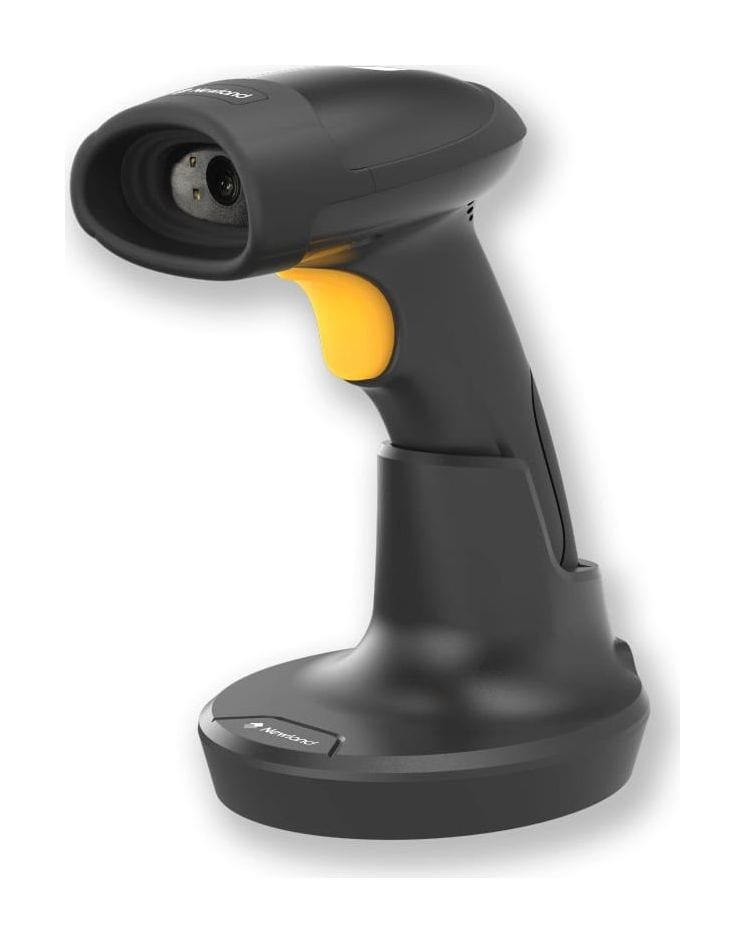
The HR32 cordless scanner that pairs with Newland's SD32 charging cradle: Bluetooth 5.0, a USB interface and a Smart Stand Mode that switches the scanner to Sense mode when it is in the stand.
Connection
Cordless · Bluetooth 5.0 · SD32 charging cradle
Interface
USB
Communication distance
50 m (direct line of sight in open air)
Battery
2,400 mAh · 12 hours at one scan per 6 seconds
Charge time
5.5 hours (trigger mode) · 7.5 hours (smart stand mode)
Newland HR32-BT-SD (HR3280-BT-SD) price in India: on written quotation. Share the model, quantity and city; we reply within one working day (Monday to Saturday, 9:30 AM to 6:30 PM).
Covered by the manufacturer's warranty. The warranty period, terms and conditions are as declared by Newland.
A cordless HR32 that scans hands-free in the stand
The HR32-BT-SD (model NLS-HR3280-BT-SD) is a cordless version of Newland's HR32 scanner, and Newland's Asia site lists it as a model of its own. It pairs with the SD32, which Newland's accessory list calls the charging cradle for the HR3280-BT-SD, and its only interface is USB. The HR32-BT with the CD32 cradle and the corded HR32 have pages of their own.
Hands-free when it is in the stand
Newland's user guide describes a Smart Stand Mode, on by default: the scanner switches from its current scan mode to Sense mode when it is inserted in the stand, and returns to its previous scan mode when it is removed.
One USB port for data and charging
The user guide shows a USB Type B port on the SD32 cradle that connects to the host device and charges the scanner. Newland lists USB as the interface of the HR32-BT-SD.
A cradle port for a Bluetooth dongle
The SD32 cradle has a USB Type A port for a Bluetooth dongle. The user guide gives the dongle three options: HID Keyboard, which needs no driver, CDC, which needs one, and HID POS.
Stored scans beyond Bluetooth range
Newland lists a memory capacity of 15000 pieces of Code 128, 20 bytes each. In the user guide's Automatic Batch Mode the scanner stores scans made out of range in its flash memory and sends them once it is back in service range.
12 hours at one scan every 6 seconds
Newland lists a 2400 mAh lithium-ion battery and an expected battery life of 12 hours of continuous operation, scanning once per 6 seconds.
White or red light
Newland says the HR3280-BT-SD can be set to white or red LED light for different workplaces. It lists a white LED and a red LED (622 nm to 628 nm), with a green LED for aiming.
These are the points buyers in India ask us about the HR32-BT-SD (HR3280-BT-SD). Mention the ones that apply to you when you request a quote.
For USB hosts
Newland lists USB as the only interface of the HR32-BT-SD, and its accessory list for this version has a 1 m USB to RS232 DB9 converter cable with DC port. Tell us the port on your POS or PC, and we confirm the version, the cable and the Bluetooth dongle in the quotation.
Plan for a 5.5 or 7.5 hour charge
Newland lists the expected charge time as 5.5 hours in trigger mode and 7.5 hours in smart stand mode, and a charging temperature of 0 °C to 45 °C. Tell us your shift length and whether the scanner will sit in the stand between scans.
Listed from -20 °C to 50 °C
Newland lists the HR32-BT-SD for operation from -20 °C to 50 °C; our HR32-BT page gives -20 °C to 60 °C for that version. Tell us the temperature where the scanner is used.
The 50 m figure is an open-air figure
Newland gives 50 m as a direct line of sight distance in open air. Its data sheet adds the test conditions: a large open space without visible obstacles such as buildings, cars, furniture, people and walls, and no serious interference from 2.4G band equipment between the host and the scanner. Tell us what stands between the scanner and the cradle.
On by default: Sense mode while the scanner is in the stand, the previous scan mode when it is removed
Software and drivers (downloads on Newland's product page)
EasyConnect, JPOS and OPOS drivers, UFCOM driver, USB-COM driver
Warranty
Warranty
Covered by the manufacturer's warranty. The warranty period, terms and conditions are as declared by Newland.
Optional accessories
SD32 charging cradle for the HR3280-BT-SD
Battery, 2400 mAh
1 m USB to RS232 DB9 converter cable with DC port
Newland's product page lists these for the HR32-BT-SD. Ask for the cradle, a battery or the converter cable in the same quotation; we confirm what is offered in the quotation.
Specifications from Newland's published documents, last checked 19 November 2026.
Makers can change specifications without notice.
About our product information
Compare
HR32-BT-SD (HR3280-BT-SD) or another model?
Newland HR32-BT-SD (HR3280-BT-SD) compared with similar models
What is the price of the Newland HR32-BT-SD (HR3280-BT-SD) in India?
The HR32-BT-SD (HR3280-BT-SD) price depends on the cable or accessories you need and the quantity. We do not publish prices: share the model, quantity and city, and we send a written quotation with current pricing and
delivery time, replying within one working day.
How is the HR32-BT-SD different from the HR32-BT?
The cradle and the interface. Newland lists the SD32 charging cradle and a USB interface for the HR32-BT-SD, and RS-232 and USB for the HR32-BT. It lists the HR32-BT-SD at -20 °C to 50 °C with a charge time of 5.5 or 7.5 hours; our HR32-BT page gives -20 °C to 60 °C and 4 hours with a power adapter. Both have the 1280 × 800 sensor, Bluetooth 5.0, a 2,400 mAh battery and a 217 g scanner.
Which cradle does the HR32-BT-SD use?
The SD32. Newland's accessory guide calls it the charging cradle for the HR3280-BT-SD, and its user guide shows two ports on it: USB Type B to the host device and for charging, and USB Type A for a Bluetooth dongle. The HR32-BT uses the CD32 cradle.
Does the HR32-BT-SD scan hands-free in the stand?
Newland's user guide describes a Smart Stand Mode that is on by default: the scanner switches to Sense mode when it is inserted in the stand and goes back to its previous scan mode when it is removed. In Sense mode it starts a decode session each time it detects a barcode presented to it.
What happens when the scanner is out of Bluetooth range?
The batch mode setting decides it. Newland's user guide gives three options: Off, the default, in which data scanned out of service range is lost; Automatic Batch Mode, in which the scanner keeps those scans in its flash memory and transmits them once it is back in service range; and Manual Batch Mode, in which every scan is stored. Newland lists a memory capacity of 15000 pieces of Code 128, 20 bytes each.
How long does the HR32-BT-SD run and charge?
Newland lists 12 hours of continuous operation at one scan every 6 seconds from the 2400 mAh battery. The expected charge time is 5.5 hours in trigger mode and 7.5 hours in smart stand mode, at a charging temperature of 0 °C to 45 °C.
Which Bluetooth modes does the HR32-BT-SD have?
Newland's user guide lists a Bluetooth HID Mode, in which the scanner is paired to the host and the features of USB HID Keyboard apply, and a Bluetooth BLE mode for host apps developed on its Bluetooth SDK. The default operating mode is Bluetooth Dongle KBW.
Can Allmark install the HR32-BT-SD (HR3280-BT-SD) and connect it to our software?
Yes. We install the HR32-BT-SD (HR3280-BT-SD) at your site, set it to send data the way your ERP, warehouse or billing software expects (our own warehouse management system included) and train your team. Tell us the software when you ask for a quote, and we include the setup in the quotation.
Get a written HR32-BT-SD (HR3280-BT-SD) quote, set up for your software
Send what you scan, where you scan it and the software it feeds; we reply with a written quotation.
Since 2014 · 2000+ customers · 75,000+ devices installed · On-site installation & training · Software & ERP integration