


Reads phone codes and damaged labels
A 1280 × 800 pixel sensor and a 1 GHz processor read 1D and 2D barcodes, including codes on customers' phone screens and damaged labels, which Honeywell says keeps checkout delays down.

IIoT
Browse IIoT
Honeywell · Corded hands-free (presentation) area-imaging scanner
A corded 1D/2D presentation scanner for billing counters: it starts scanning when an item comes into view, reads codes on phone screens and damaged labels, and lifts off the counter for bulky items.
Orbit HF680 price in India: ask our team for today's competitive price. Share your requirement and budget, and we will help you choose the right configuration and send a written quotation with current pricing and delivery time.
Covered by the manufacturer's warranty. The warranty period, terms and conditions are as declared by Honeywell.
Already use one? Need service? Log a service call for the Honeywell Orbit HF680
Why the Orbit HF680
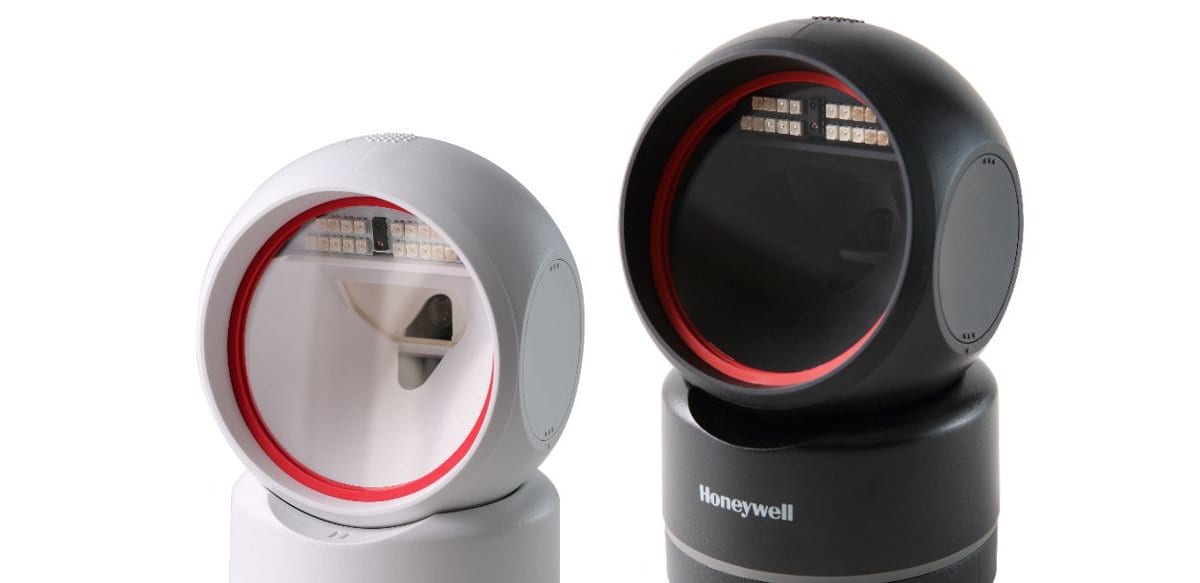
The Orbit HF680 is Honeywell's 2D hands-free area-imaging scanner for point-of-sale counters. It sits on the counter and scans each item the cashier holds up, and it can be lifted off to scan something too big to bring to it.
A 1280 × 800 pixel sensor and a 1 GHz processor read 1D and 2D barcodes, including codes on customers' phone screens and damaged labels, which Honeywell says keeps checkout delays down.
In IR trigger mode an infrared sensor detects the item and the scanner reads it; presentation mode scans whenever it sees a barcode, and streaming presentation keeps the light on continuously.
Most items are held up to it on the counter. When a carton or a sack is too big to bring over, the cashier picks the scanner up and takes it to the item; for tall or flat items, tilt the scan head up or down.
The LEDs sit recessed inside the scan window, so the customer across the counter is not looking into bright light, and they switch off by themselves when nothing is being scanned.
It connects over USB, as a keyboard or a USB serial port, or over RS-232, and Honeywell provides OPOS and JPOS drivers for POS software. We set the interface, keyboard layout and suffix for your billing program.
Honeywell designs it to withstand 1 m drops and seals it to IP42, and rates it to work from -10 °C to 40 °C in 0% to 95% humidity, non-condensing.
Used in
For buyers in India
These are the points buyers in India ask us about the Orbit HF680. Mention the ones that apply to you when you request a quote.
Keep the counter out of direct sun from a shop front or shutter. Honeywell rates the HF680 to work from -10 °C to 40 °C.
Honeywell's symbologies chart lists QR Code, Data Matrix and PDF417 for the HF680, so one scanner reads product barcodes, a GST e-invoice QR and a code on a customer's phone. What happens to the scanned text depends on your billing software.
Honeywell's quick start guide shows the RS-232 connection with a separate power supply and the USB connection without one. Tell us which port your POS uses, and we quote the right Honeywell cable and, for RS-232, the power supply.
Train cashiers to present items close to the window: Honeywell rates a 13 mil UPC-A from 0 to 210 mm and a 20 mil QR code from 0 to 210 mm.
Specifications
| General | |
|---|---|
| Model | Orbit HF680 (Honeywell: Orbit HF680 2D Hands-Free Area-Imaging Scanner) |
| Form factor | Hands-free (presentation) scanner; can be picked up; scan head tilts up or down |
| Connection | Corded (no wireless, no battery) |
| Generation | Honeywell's current documents cover the second-generation HF680 (part numbers with "R" after HF680) |
| Scan modes | IR trigger (infrared object detection), presentation, streaming presentation |
| Scanning | |
| Image sensor | 1280 × 800 pixels |
| Processor | 1 GHz |
| Field of view | 47° horizontal, 30° vertical |
| Motion tolerance | Up to 2.5 m/s for 13 mil UPC at optimal focus |
| Pitch, skew | ±60°, ±70° |
| Print contrast | 20% minimum reflectance difference |
| Illumination | Recessed LED lights in the scan window; turn off automatically when not in use |
| Decode capability | Standard 1D, PDF and 2D symbologies; Honeywell notes decoding depends on the kit configuration |
| Minimum resolution | 1D: 3 mil; 2D: 6.7 mil |
| Light levels | 0 to 100,000 lux |
| Symbologies (Honeywell's symbologies chart) | |
| 1D | UPC, EAN, Code 128, Code 39, Code 93/93i, Code 32, Codabar (NW7), Code 11, Interleaved 2 of 5, Matrix 2 of 5, Code 2 of 5, MSI, GS1 DataBar, Telepen, Trioptic Code, Label Code, China Post |
| Stacked | PDF417, MicroPDF417, GS1 Composite, Codablock F, TCIF Linked Code 39 (TLC39) |
| 2D | QR Code, Micro QR Code, Data Matrix, Aztec, MaxiCode, Dot Code, Chinese Sensible (Han Xin) Code |
| Postal | Intelligent Mail, Australian Post, British Post, Canadian Post, ID-tag (UPU 4-state), Japanese Post, Netherlands (KIX) Post, Korea Post, Planet Code, Postnet |
| OCR | OCR-A, OCR-B, OCR MICR (E 13 B) |
| Note | Honeywell's chart covers the HF680 family; what a scanner decodes depends on its kit configuration, which we confirm in the quotation |
| Typical decode ranges (Honeywell) | |
| 5 mil Code 39 | 0 to 100 mm |
| 20 mil Code 39 | 0 to 300 mm |
| 13 mil UPC-A | 0 to 210 mm |
| 6.7 mil PDF417 | 0 to 110 mm |
| 10 mil Data Matrix | 0 to 90 mm |
| 20 mil QR Code | 0 to 210 mm |
| Conditions | Honeywell notes performance may be affected by barcode quality and environmental conditions |
| Connectivity | |
| Host interfaces | USB, RS-232 |
| Interface types | USB PC keyboard, USB serial and RS-232 serial port |
| Keyboard layouts | Set by scanning a country code (USA default; more countries in Honeywell's user guide) |
| POS drivers | OPOS and JPOS drivers from Honeywell |
| Power | |
| Input voltage | 5 V DC ± 0.5 V |
| Operating power | 2.0 W (400 mA at 5 V) |
| Standby power | 0.85 W (170 mA at 5 V) |
| Physical and environment | |
| Dimensions (L × W × H) | 85 × 88 × 139 mm |
| Weight | 278 g (±10 g) |
| Operating temperature | -10 °C to 40 °C |
| Storage temperature | -40 °C to 60 °C |
| Humidity | 0% to 95% relative humidity, non-condensing |
| Drops | Designed to withstand 1 m drops |
| Sealing | IP42 (Honeywell product page) |
| Software | |
| Configuration | Honeywell EZConfig for Scanning (online configuration tool), or the set-up barcodes in Honeywell's quick start guide (interface, keyboard country, scan mode, CR or Tab suffix, Code ID prefix, data format editor) |
| Warranty | |
| Warranty | Covered by the manufacturer's warranty. The warranty period, terms and conditions are as declared by Honeywell. |
Tell us which port your POS or PC uses; we quote the matching cable and, where needed, the power supply, and confirm the plug type in the quotation.
Specifications from Honeywell's published documents, last checked 14 October 2026. Makers can change specifications without notice; we confirm the exact model and configuration in your written quotation. About our product information
Compare
| Feature | Honeywell Orbit HF680 | Zebra DS9308 | Newland FR4080 |
|---|---|---|---|
| Form | Presentation scanner, tilting head, corded | Presentation scanner on a tilting base, corded | Desktop scanner, corded |
| Image sensor | 1280 × 800 | 1280 × 800 | 1280 × 800 |
| Field of view | 47° H × 30° V | 52° H × 33° V | 51° H × 32° V |
| 13 mil UPC/EAN range | 0 to 210 mm (UPC-A) | 0 to 22.4 cm (UPC) | 10 to 280 mm (EAN-13) |
| Interfaces | USB, RS-232 | USB, RS232, keyboard wedge, IBM 46XX | USB, RS-232 |
| Sealing | IP42 | IP52 | IP52 |
| Weight | 278 g (±10 g) | 318 g | 290 g |
| Best for | Billing counters that scan phone codes and need a scanner that can be lifted | Counters that need keyboard wedge or IBM 46XX, or IP52 sealing | A wider operating temperature range (-20 °C to 60 °C) |
If your job differs from what the Orbit HF680 is built for, these Honeywell models may fit it better:
Not sure which one fits? Tell us how you will use it and we will recommend a model.
Downloads
Questions buyers ask
The Orbit HF680 price depends on the cable or accessories you need and the quantity. Ask our team for today's competitive price: share your requirement and budget, and we will help you choose the right configuration and send a written quotation with current pricing and delivery time.
Both are current Honeywell presentation scanners. The Orbit 7190g combines a 20-line omnidirectional laser with an area imager; the Orbit HF680 is an area imager only, with a 1280 × 800 sensor, an infrared trigger and a scan head that tilts. Tell us what your counter scans (printed labels, phone codes, QR codes on bills) and we recommend one and quote it.
Yes. Honeywell says it scans digital barcodes, the codes customers show on their phones, and damaged barcodes quickly, using its 1280 × 800 sensor and 1 GHz processor. Send us a sample of your hardest label if you want it tested before you order.
Yes. Honeywell designed it mainly as a presentation scanner, but its shape lets the cashier lift it to scan large, bulky items, and the scan head tilts up or down for items of different sizes. It is corded, so the reach depends on the cable length you choose.
Over USB, as a USB keyboard or a USB serial port, or over RS-232. Honeywell provides OPOS and JPOS drivers for POS software and lets you set the keyboard country, suffix and data format by scanning set-up barcodes. Tell us your billing software and the PC or POS model, and we set it up for it.
Close: Honeywell rates a 13 mil UPC-A from 0 to 210 mm and a 20 mil Code 39 from 0 to 300 mm. It is built for items held up to the window at a counter, not for reading labels from a distance.
Yes. We install the Orbit HF680 at your site, set it to send data the way your ERP, warehouse or billing software expects (our own warehouse management system included) and train your team. Tell us the software when you ask for a quote, and we include the setup in the quotation.
Send what you scan, where you scan it and the software it feeds; we reply with a written quotation.
Since 2014 · 2000+ customers · 75,000+ devices installed · On-site installation & training · Software & ERP integration